

The best family organization system isn’t the one with the most features. A family organization system toolkit works when it gives everyone one clear place to find schedules, routines, and household tasks. Keep the setup simple, and review the week together so plans don’t stay in one person’s head.
It makes sense if the calendar, group chats, reminders, and chore lists already feel like another job. The problem isn’t a lack of effort; important details can simply end up scattered across too many places.
This guide compares paper planners, shared calendars, apps, and chore tools to help you choose a setup that fits your household. You’ll also find practical ways to plan meals, share age-appropriate responsibilities, and keep the system useful as schedules change. The goal isn’t to organize every moment. It’s to make the next step easier to see.
Key Takeaways
- Bring family, work, and personal plans into a shared routine so key details aren’t held in one person’s head.
- Choose paper, a wall calendar, or an app based on where your household can reliably see and update the schedule.
- Match the tool to your family’s ages, preferences, devices, and privacy needs. A simpler setup can be easier to keep using.
- Make chores visible and manageable by assigning clear tasks that fit each family member’s abilities.
1. How do I keep my family organized?
Keep family, work, and personal plans in one shared weekly view. Add fixed commitments first, such as school drop-off, work shifts, appointments, and recurring activities like soccer practice. Then block personal needs, such as study time or a quiet evening at home. Seeing overlaps early makes coordination easier. A family organization system toolkit can bring these moving parts into one routine.
Use a weekly menu to connect meals with the household calendar. If Tuesday includes late soccer practice, plan leftovers or a quick meal. Add recipes to the days you’ll serve them, then build a grocery list from the ingredients. Before shopping, check the pantry and cross off what you already have. Keep one shared list so anyone can add milk or fruit when it’s running low.
Make meal planning a regular part of the family routine. During a weekly check-in, invite everyone to suggest a meal, note dietary preferences, and choose recipes that fit the week ahead. Keep reliable favorites together, such as a simple pasta dinner or weekend soup. The aim is a usable plan, not a new recipe every night.
Put special events and holidays on the same calendar as everyday commitments. For a birthday, add the date, food plan, invitations, and preparation tasks. For a holiday meal, assign who brings each dish and when to shop. One event view helps the family see what needs doing before the day arrives.
Family organizations and health-related programs can use family organization resources, including Title V Programs, Medicaid programs, hospitals, and healthcare providers. To find options through US schools, libraries, or community organizations, look for local family resource pages, program calendars, or workshops. Children can also take part at home: ages 11–14 can manage homework schedules and contribute to family meetings. Give each child a clear role, such as adding an activity or suggesting a meal.
2. Family scheduling with paper planners, command centers, and calendar apps
A wall calendar can turn the kitchen into a visible command center. Place it near a spot where family members naturally pause, then add morning routines, after-school logistics, evening plans, and weekend commitments. A small board or tray nearby can hold permission slips and appointment notes. Use different ink colors for quick scanning, such as blue for work and red for after-school activities.
For a digital family calendar, choose one shared space and agree what belongs there. Add each family member’s activities, then include travel time or preparation tasks when they affect the day. Children aged 7–10 can have their own calendar section and take responsibility for remembering activities. A weekly review helps everyone see what’s coming and catch schedule clashes before they turn into last-minute messages.
Paper and digital tools can work together without duplicating every detail. Keep the calendar app as the source for changing appointments, then copy the key week onto a wall planner for a household glance. That gives children and adults a shared view without relying on a group chat where logistics can disappear beneath 200 messages.
To organize recurring chores, add each task to the family calendar on the day it needs doing, assign an owner, and mark it clearly. Review the schedule together each week, adjusting assignments when activities or availability change.
Shared apps can expose private details if an account is accessed by someone unintended or information is shared too widely. Choose a tool with encryption and two-factor authentication, and limit access to the family members who need it.
Pick the format people will actually check: a paper calendar by the door, a shared digital calendar, or both. A clear family scheduling system can make daily handoffs easier to see and maintain.
3. Choosing tools for different family needs
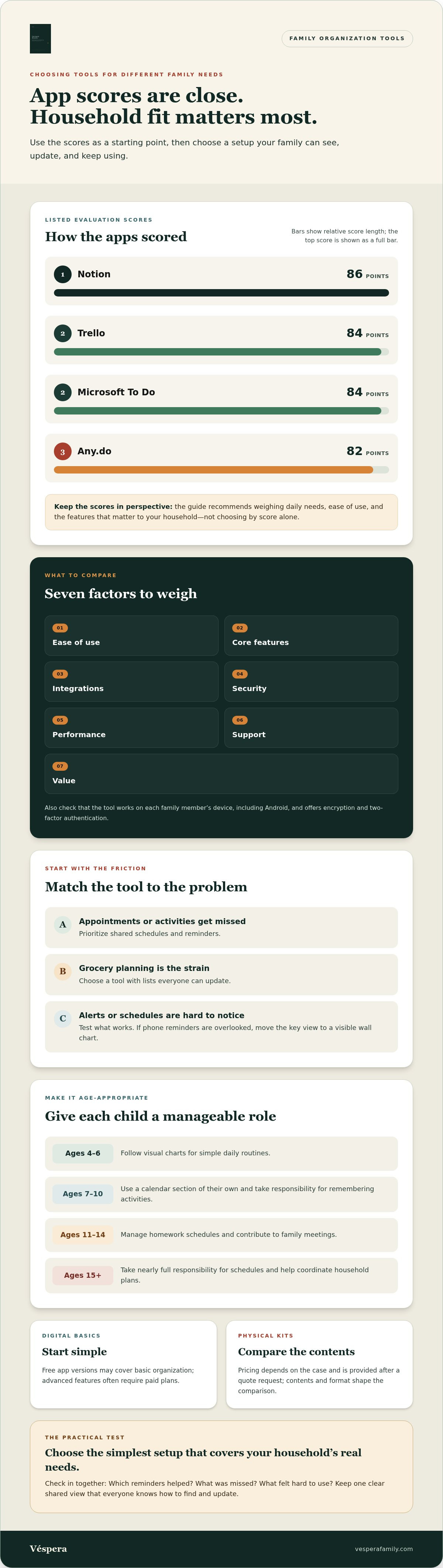
Start with the friction you want to remove. If appointments and activities are being missed, prioritize shared schedules and reminders. If grocery planning is the strain, choose a tool with lists everyone can update. Check that it works on each family member’s device, including Android, and offers encryption and two-factor authentication.
There’s no single best app for every household. In the listed evaluation, Notion scored 86 points, Trello and Microsoft To Do scored 84 points each, and Any.do scored 82 points. Treat those scores as a starting point, then weigh ease of use, core features, integrations, security, performance, support, and value against your family’s daily needs.
For basic organization, free app versions may be enough; advanced features often require paid plans. Physical kit pricing depends on the case and is provided after a quote request, while the kit’s contents and format shape the comparison.
Fit the system to the whole family, not just the adults. Children aged 4–6 can follow visual charts for simple daily routines, while teenagers aged 15 and older can take nearly full responsibility for their schedules and help coordinate household plans. Keep the shared view accessible, but give each child tasks they can manage.
Test whether the system works with a short check-in: ask which reminders helped, which activities were missed, and what felt hard to use. If someone keeps overlooking a phone alert, move it to a visible wall chart. For travel, use one shared checklist for packing, appointments, and departure tasks, then assign each item to someone.
Choose the simplest setup that covers your household’s real needs. A calendar app, paper list, or combination can work if everyone knows where to find the next task and how to update it.
4. Household task and chore management
Chores work better when each task has a clear owner, a visible finish line, and a place in the household routine. List recurring jobs such as dishes, bins, laundry, and pet care. Assign each by ability and availability, not by who notices it first. This can ease the mental load that often falls to one parent or caregiver.
Keep the system easy to update. A customized notepad can track recurring chores, grocery needs, and habits in one place. Note the task, its owner, and when it needs doing. A simple mark beside “done” gives parents and children a shared record without a complicated app. If a chore is missed, discuss whether its timing or assignment needs to change.
Children can generally handle basic household chores by age 10 if they’ve been taught to do them safely. Show the task, explain what finished looks like, and let the child try while an adult is available to guide them. Keep the first assignment focused, such as putting away clean dishes, rather than handing over several unfamiliar jobs at once.
Laundry needs its own plan because clothing isn’t the only load. A household of up to 7 people should be able to arrange a laundry schedule; include bedding so it doesn’t disappear from the routine. Note who gathers, washes, folds, and puts away each load. That makes the whole process visible, not just the washing-machine step.
Use a chore tracker to show progress and spot uneven workloads. Rewards are optional; if your family uses an allowance, sweeping the dining room floor after dinner could be worth 50 cents to a child. Explain the task and reward plainly, then review whether the arrangement feels fair. Appreciation can also recognize effort without turning every household contribution into a payment.
For a more focused way to share household responsibilities, build a workable family chore system that makes tasks easier to see and manage.
Véspera: Family Brain Kit
Family Brain Kit is a practical next step if you want to turn these ideas into a clearer system for home life. Use it when schedules, household tasks, and everyday planning feel scattered across too many places. Its templates and workflows help make the moving parts easier to see and manage, without treating every busy week as a personal failure.
Start by noticing where coordination breaks down most often. Is it shared responsibilities, family routines, or keeping plans visible to everyone? That gives you a practical place to begin and helps shape a system around your household, rather than adding tools without a clear purpose.
If you’d like to explore whether Family Brain Kit fits your family’s needs, visit Véspera’s website.
Let your system grow with your family
A household routine doesn’t need to be perfect to be useful. Let it change as school terms shift, new activities begin, or family members take on different responsibilities. Choose one small adjustment to try, then notice whether it makes the week clearer or adds another task to maintain. That feedback is part of the system.
A family organization system toolkit is most helpful when it supports the way your household actually works. If you’re ready to shape a more workable approach, Véspera offers Family Brain Kit and Family Reset. Each can be a starting point for bringing more structure to home life.
Contact Véspera to plan your system. You can take the next step at a pace that feels manageable, and build from there.
Frequently Asked Questions
How do I keep my family organized?
Give new information one entry point before deciding where it belongs. For example, place school forms, appointment cards, and activity notices in one inbox basket. During a household check-in, move each item to its next action: calendar, response, or recycling. This simple intake step keeps loose papers and last-minute requests from becoming one person’s private tracking job.
What is a family organization system toolkit?
A family organization system toolkit is a connected set of methods and materials for capturing plans, assigning ownership, and finding household information again. It might include a shared calendar, task board, labeled paper folders, and simple update routines. A useful test is whether another family member can find the current plan without asking the person who recorded it.
What tools and supplies should a family organization toolkit include?
Choose supplies based on where information enters your home. A tray by the door can hold school notices; labeled folders can separate forms to sign, papers to return, and records to keep. Add a pen and notepad for follow-up tasks. For digital records, use clear folder names such as “School” or “Travel” to make documents easier to find.
How do family organization systems compare: paper planners, apps, and hybrid setups?
Paper planners suit people who think best by writing and want a visible reference. Apps let family members update plans from different places. A hybrid setup can keep changing details in an app while offering a paper view for quick household checks. Choose based on who will maintain the system and where people look for information, not on the longest feature list.
What are the best ways to organize family schedules, meal plans, school papers, and household tasks?
Give each type of information a clear home and next action. Put schedule changes where everyone checks plans, and sort school forms by status. For example, move a permission slip from “needs signature” to “ready to return.” Keep task instructions near the supplies they need. These handoffs help another caregiver see what remains without rebuilding the whole plan.
How much do popular family organization apps and physical kits cost?
Free app versions may cover basic needs, while advanced features often require paid plans. Physical kit pricing is provided after a quote request.